

Skew Protection
Skew Protection ensures version consistency between clients and servers during deployments. When a user begins a session on version N of an application, all subsequent requests within that session continue to be served by version N, even after version N+1 is deployed.
The Problem
Section titled “The Problem”When a web application is redeployed, users who loaded the previous version’s frontend may send requests to the new version’s backend. This “version skew” causes failures when APIs, assets, or data schemas change between versions.
For example: a form field is renamed on both frontend and backend. Users who loaded the form before the deploy but submit after it will hit an error because the old field name is no longer recognized.
Standard Kubernetes rolling deployments replace pods gradually but don’t maintain session-to-version affinity. Kubernetes Services route to all healthy pods regardless of version.
How It Works
Section titled “How It Works”ICC implements skew protection using the Kubernetes Gateway API for routing and session cookies for version pinning:
- Each application version runs as a separate, immutable K8s Deployment with its own Service
- ICC manages HTTPRoute resources that direct traffic to the correct version
- New visitors receive a
__plt_dplcookie pinning them to the current production version - When a new version is deployed, existing users continue being routed to their pinned version via cookie matching
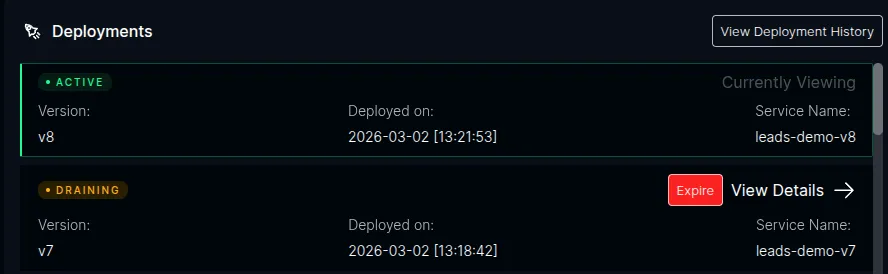
- Once the old version has no more traffic (or the grace period expires), ICC drains and cleans up the old version
Version Detection
Section titled “Version Detection”ICC detects new versions automatically. When a pod registers with ICC, it reads the pod’s Kubernetes labels:
app.kubernetes.io/name— identifies the applicationplt.dev/version— identifies the version
If the version is new for that application, ICC records it and updates the routing rules.
Routing
Section titled “Routing”Routing is handled entirely by the Kubernetes Gateway API — no custom gateway or reverse proxy is required. ICC creates and manages HTTPRoute resources with rules that:
- Match cookies — requests with a
__plt_dplcookie matching a draining version are routed to that version’s Service - Match headers — API clients can use the
x-deployment-idheader instead of cookies - Default to production — requests with no cookie or header match are routed to the current production version and receive a
Set-Cookieresponse
Session Pinning
Section titled “Session Pinning”The __plt_dpl cookie is set on responses to new visitors via the Gateway API’s ResponseHeaderModifier. The cookie includes:
HttpOnly— no JavaScript accessSecure— HTTPS onlySameSite=Lax— preserves pinning for users arriving via external linksMax-Age— configurable (default: 12 hours)Path— scoped to the application’s path prefix
Good to Know
Section titled “Good to Know”- Opt-in only. Skew protection is disabled by default. When disabled, ICC does not interact with the Gateway API at all and behaves exactly as it does today.
- User-managed Deployments. Users create their own versioned K8s Deployments. ICC does not create Deployments — it detects versions and manages routing.
- Standard Kubernetes APIs. Uses the Kubernetes Gateway API (
HTTPRouteresources). Any conformant Gateway controller works. - Labels, not environment variables. ICC reads
app.kubernetes.io/nameandplt.dev/versionfrom K8s pod labels. No special environment variables needed for skew protection.
Next Steps
Section titled “Next Steps”- Prerequisites — Gateway API setup and compatible controllers
- Deploying Versioned Applications — how to deploy with version labels
- Version Lifecycle — Active, Draining, and Expired states
- Configuration — environment variables and Helm values