

Skew Protection
Skew Protection keeps requests that carry a deployment pin on the matching application version while a newer version becomes production. Query pinning is per request or asset URL; cookie pinning can preserve the version across browser requests.
The Problem
Section titled “The Problem”When a web application is redeployed, users who loaded the previous version’s frontend may send requests to the new version’s backend. This “version skew” causes failures when APIs, assets, or data schemas change between versions.
For example: a form field is renamed on both frontend and backend. Users who loaded the form before the deploy but submit after it will hit an error because the old field name is no longer recognized.
Standard Kubernetes and ECS rolling deployments replace instances gradually but do not maintain client-to-version affinity. A stable Service or ECS service can therefore mix old clients with new code.
How It Works
Section titled “How It Works”ICC implements skew protection through a provider-neutral version lifecycle:
- Each application version runs as a separate workload and addressable backend
- ICC manages an HTTPRoute on Kubernetes or ALB listener rules on ECS
- Each client is pinned to the version it started on, by one of the two mechanisms below
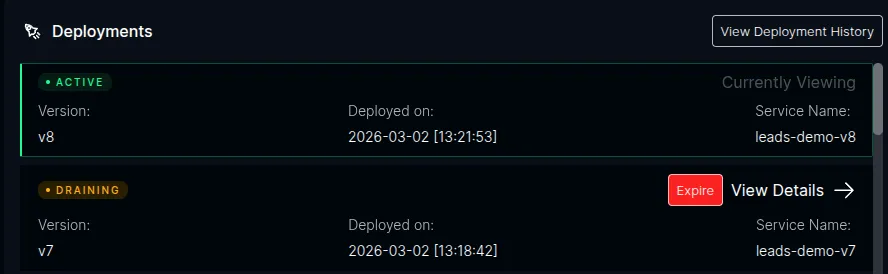
- When a new version is deployed, existing users continue being routed to their pinned version
- Once the old version has no traffic and no protected work, or reaches its max-alive limit, ICC drains and optionally cleans it up
Version Detection
Section titled “Version Detection”ICC detects new versions when a Watt instance registers. It reads provider metadata such as the application name, version, controller/service identity, hostname, and path:
- On Kubernetes this metadata normally comes from pod and workload labels
- On ECS it comes from the ECS service, task metadata, and tags
An explicit version is optional for basic version tracking because ICC can derive
one from the deployment or image. Query pinning requires an explicit version
that matches the PLT_DEPLOYMENT_ID baked into the image.
Pinning Mechanisms
Section titled “Pinning Mechanisms”A client can carry its version in one of two ways, selected by the PLT_SKEW_DEFAULT_ROUTING_MODE setting. The two are strictly exclusive: an application uses one or the other, never both, and there is no fallback between them.
Query pinning (query, the default). The application bakes a ?dpl=<version> query parameter into its own assets at build time, so every request an old client makes already carries the version that served it. ICC matches that parameter and routes to the matching version.
This requires the build to receive its version as PLT_DEPLOYMENT_ID. A version
built without a matching id gets no pinning rule and requests carrying that id
fall through to the active version. Query pinning is the only mode supported on
ECS.
Cookie pinning (cookie). New visitors receive a __plt_dpl cookie set via the Gateway API’s ResponseHeaderModifier, and later requests are matched back against it. The cookie includes:
HttpOnly— no JavaScript accessSecure— HTTPS onlySameSite=Lax— preserves pinning for users arriving via external linksMax-Age— configurable (default: 12 hours)Path— scoped to the application’s path prefix
Cookie pinning needs no cooperation from the build, which makes it the option for applications whose pipelines cannot pass the version. It requires an edge that can add a response header, so it is Kubernetes-only.
Routing
Section titled “Routing”ICC builds the same ordered route intent for both providers:
- Match the pinning key — a
?dplquery parameter or a__plt_dplcookie, depending on the mode, routed to that version’s backend - Match headers — API clients can use the
x-deployment-idheader in either mode - Default to production — requests with no match are routed to the current production version, and in cookie mode receive a
Set-Cookieresponse
On Kubernetes, ICC renders that intent as an HTTPRoute and Machinist applies
it through the Gateway API. On ECS, ICC sends the neutral route plan to
Machinist, which applies host-scoped ALB listener rules and resolves each backend
to the version’s target group.
Good to Know
Section titled “Good to Know”- Opt-in only. Skew protection is disabled by default. When disabled, ICC does not create version-aware HTTPRoute or ALB rules.
- Three actuation modes. In
observe, customers create workloads and ICC manages routing. Inmanage, ICC manages workloads and routing. Inadvise, ICC returns plans and waits to observe their application. - Provider-specific routing. Kubernetes uses Gateway API. ECS uses ALB directly and requires hostname-based, query-only routing.
- Provider-neutral deploy API.
POST /deploycreates the requested workload on Kubernetes or ECS in every actuation mode.POST /deploy/planis read-only. - Build identity for query pinning. The explicit version and the image’s
PLT_DEPLOYMENT_IDmust match. Cookie pinning does not require a build id.
Next Steps
Section titled “Next Steps”- Prerequisites — Kubernetes Gateway API and ECS ALB requirements
- Deploying Versioned Applications — Kubernetes and ECS deployment flows
- Version Lifecycle — activation, draining, and expiry states
- Configuration — environment variables and Helm values