

Version Lifecycle
ICC manages each application version through six persisted states: Staged, Pending Apply, Active, Draining, Pending Expire, and Expired. The intermediate states ensure that ICC never records a route or workload change as complete before it has been applied or observed.
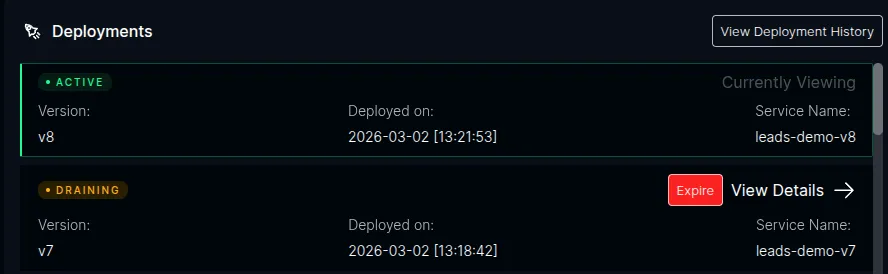
The ICC dashboard shows the current state of all versions in the Deployments panel:
States
Section titled “States”The states below are the same on Kubernetes and ECS and in both routing modes;
only how a request is pinned differs. In query mode (the
default) the client carries ?dpl=<version>, baked into its assets at build time, and nothing sets a cookie. In
cookie mode the gateway sets __plt_dpl on the response and matches it on the next request. ECS supports query
mode only. See Configuration.
Staged
Section titled “Staged”A version waiting for manual approval. This state is used when approval is enabled for the application.
- The current Active version remains the production backend
- The staged version is not added to the default route
- Approving it moves it into Pending Apply
- Rejecting it removes or scales down its workload without making it Active
Approval is supported in observe and manage modes. It is disabled in
advise mode because ICC does not control the route cutover.
Pending Apply
Section titled “Pending Apply”A version selected for activation whose desired route has not yet been confirmed.
- On Kubernetes, ICC applies or waits for an
HTTPRoute - On ECS, ICC applies or waits for an ALB route plan
- A failed or stale route apply leaves the version in Pending Apply so the checker can rebuild the desired route and retry
- The previous Active version does not become Draining until the new route is confirmed
Active
Section titled “Active”The current production version. Exactly one version per application is Active at a time.
- Requests that carry no pin are routed here: no
?dplin query mode, no__plt_dplcookie in cookie mode - The routing rule’s default points to this version’s backend
- In cookie mode the response carries
Set-Cookie: __plt_dpl=<version>. In query mode there is no response header at all: the HTML this version serves already references assets stamped with its own version, which is what pins the page - ICC’s autoscaler scales this workload based on real-time load
Draining
Section titled “Draining”A previously active version that still serves existing sessions.
- No new sessions are assigned to it
- Requests pinned to this version keep reaching it:
?dpl=<version>in query mode, a matching__plt_dplcookie in cookie mode. Thex-deployment-idheader reaches it in either mode - ICC monitors this version’s own traffic via Prometheus
- The autoscaler continues scaling this workload based on its actual traffic
- A configurable grace period keeps the version alive unconditionally (default: 30 minutes for HTTP)
- A hard max-alive ceiling force-expires the version regardless of remaining traffic (default: 24 hours for HTTP)
Pending Expire
Section titled “Pending Expire”A version selected for expiry whose route and workload teardown has not yet been confirmed.
- ICC first removes the version from the desired route
- ICC then scales down or deletes the provider workload
- A failed teardown remains retryable in Pending Expire
- In
advisemode, the version stays here until ICC observes that the external actor applied the teardown plan
Expired
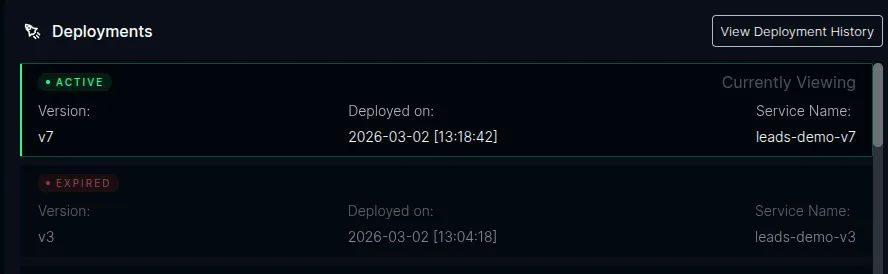
Section titled “Expired”A version that has been fully drained and is no longer serving traffic.
- Its version-specific route rules have been removed
- Autoscaling is disabled
- The workload is scaled to 0 replicas/tasks
- If auto-cleanup is enabled, its provider resources are deleted
State Transitions
Section titled “State Transitions”First Version Detected
Section titled “First Version Detected”When the very first version of an application registers with ICC:
- ICC identifies the version and its provider workload
- If approval is required, the version is recorded as Staged
- Otherwise it enters Pending Apply and ICC applies the desired default route
- The version becomes Active only after that route is applied or observed
- In cookie mode the Kubernetes route adds
Set-Cookieto responses. In query mode the version’s assets already carry?dpl=<version>
New Version Deployed
Section titled “New Version Deployed”When a new version is detected while an Active version exists:
- The new version becomes Staged when approval is required; otherwise it enters Pending Apply
- ICC updates or plans the routing rules:
- Adds a pinning rule for the draining version: a
?dplquery match in query mode, a__plt_dplcookie match in cookie mode - Adds a header-match rule for the draining version (for API clients)
- Updates the default rule to point to the new version
- Adds a pinning rule for the draining version: a
- Once the desired route is confirmed, the new version becomes Active and the previous Active version becomes Draining
Version Expires
Section titled “Version Expires”The draining checker evaluates each draining version on every check interval. It applies a three-phase decision:
- Grace period — while the version has been draining for less than the grace period, it is kept alive unconditionally. No traffic or policy checks are run.
- Policy checks — after the grace period, ICC runs the expire policy for the version. For HTTP traffic this means requiring two consecutive zero-RPS readings for that version alone (see Application Metrics for how a version is identified on each platform). A failed query or any traffic resets the zero-reading streak.
- Max alive — if the version has been draining longer than the max-alive ceiling, it is force-expired regardless of remaining traffic or active work.
A version can also be manually expired by clicking the Expire button in the ICC dashboard, which skips all checks.
When a version expires:
- The version enters Pending Expire
- ICC removes the version’s matching rules from the HTTPRoute or ALB listener
- Autoscaling is disabled for the workload
- The Kubernetes Deployment or ECS service is scaled to zero
- If auto-cleanup is enabled, the provider resources are deleted
- ICC records the version as Expired only after teardown succeeds or is observed
Redeployment of an Expired Version
Section titled “Redeployment of an Expired Version”If a previously expired version is redeployed with the same version label, ICC moves it to Pending Apply. It becomes Active after its workload is ready and its route is confirmed. A still-running Draining version can instead be promoted directly from the ICC version manager.
Traffic Monitoring
Section titled “Traffic Monitoring”ICC monitors traffic to draining versions by querying Prometheus for per-version requests per second (RPS):
- Check interval — how often the draining checker runs (default: every 60 seconds, configurable via
PLT_SKEW_CHECK_INTERVAL_MS) - Traffic window — the Prometheus query window for RPS measurement (default: 30 minutes, configurable via
PLT_SKEW_TRAFFIC_WINDOW_MS) - Initial skip — the RPS check is skipped until the version has been draining longer than the traffic window to avoid false zero readings
- Zero streak — HTTP versions expire only after two consecutive zero-RPS checks; a query failure or non-zero result resets the streak
The query counts application ingress. Infrastructure health probes must use a
dedicated health endpoint that is outside the application listener. In
particular, an ECS target group should check HTTP:9090/ready, not a route on
port 3042. Otherwise ALB probes produce non-zero RPS for every live version and
block early expiry under both the HTTP and workflow policies.
Grace Period and Max Alive
Section titled “Grace Period and Max Alive”The draining lifecycle is controlled by two time-based thresholds:
- Grace period — after a version enters Draining, it is kept alive unconditionally for this duration. No traffic checks or policy evaluations run during this window. This gives existing sessions time to complete naturally.
- Max alive — the hard ceiling on how long a version can remain in Draining. After this duration, ICC force-expires the version regardless of remaining traffic. This ensures versions are eventually cleaned up even if session tracking is imperfect.
Between the grace period and max alive, ICC runs the expire policy on each check interval to determine whether the version can be expired early (e.g. zero traffic detected).
Both thresholds are configured separately for HTTP and workflow traffic, because workflow runs can take hours or days while HTTP requests complete in seconds:
| Setting | Default | Description |
|---|---|---|
PLT_SKEW_HTTP_GRACE_PERIOD_MS | 1800000 (30 min) | Grace period for HTTP versions |
PLT_SKEW_HTTP_MAX_ALIVE_MS | 86400000 (24h) | Max alive for HTTP versions |
PLT_SKEW_WORKFLOW_GRACE_PERIOD_MS | 3600000 (1h) | Grace period for workflow versions |
PLT_SKEW_WORKFLOW_MAX_ALIVE_MS | 259200000 (72h) | Max alive for workflow versions |
The expire policy is selected per-version based on the plt.dev/workflow label (see below).
See Configuration for all options.
Auto-Cleanup
Section titled “Auto-Cleanup”When a version expires, ICC always scales its workload to zero. Optionally, ICC can also delete its provider resources:
- Disabled by default — expired workloads remain at zero for users to remove manually
- Enable via
PLT_SKEW_AUTO_CLEANUP=true
Multiple Concurrent Versions
Section titled “Multiple Concurrent Versions”If version v3 is deployed while v1 is still draining (v2 is Active), both v1 and v2 drain simultaneously.
Workflow-Aware Draining
Section titled “Workflow-Aware Draining”Applications that use the Vercel Workflow DevKit with @platformatic/world need special draining behavior. Workflow runs can suspend in ways that are invisible to infrastructure — sleeping, waiting for webhooks, or paused on hooks — with no HTTP traffic and no queue messages.
When workload metadata has plt.dev/workflow: "true", or an ICC deploy request
selects expirePolicy: "workflow", ICC uses the workflow expire policy
instead of the default HTTP policy. This changes two things:
- Separate timings — workflow versions use
PLT_SKEW_WORKFLOW_GRACE_PERIOD_MSandPLT_SKEW_WORKFLOW_MAX_ALIVE_MSinstead of the HTTP equivalents - Active work check — ICC first requires zero Prometheus RPS, then queries the Workflow Service for active runs, pending hooks, waiting sleeps, and queued messages. The version is kept alive while it has HTTP traffic or any workflow count is non-zero.
This ensures that a draining version is not expired while workflow runs are still in progress, even if there is zero HTTP traffic to its instances.
Expired Pin Handling
Section titled “Expired Pin Handling”When a request arrives pinned to a version that has been fully expired (its routing rule removed), the pin matches no rule. The request falls through to the default rule and is routed to the current production version, rather than erroring.
In cookie mode the response then sets a new cookie, replacing the stale one. In query mode a fresh navigation carries
no ?dpl and is served by the active version, whose HTML re-stamps every asset URL with its own version. The one case
to know about: a page left open past a version’s max-alive ceiling keeps requesting assets with the expired ?dpl, and
the active version may no longer have those content-hashed filenames, so individual asset requests can 404 until the
page is reloaded.