

Testing with Desk
Desk can spin up a local Kubernetes cluster with skew protection pre-configured. This is the easiest way to try out versioned deployments before going to production.
The skew-protection profile installs Envoy Gateway as the Gateway API controller, creates a Gateway resource, and enables skew protection on ICC with shorter timeouts suited for testing.
Prerequisites
Section titled “Prerequisites”Follow the Getting Started guide to install Desk and configure your environment (GitHub OAuth, .env file, /etc/hosts).
Start the cluster
Section titled “Start the cluster”desk cluster up --profile skew-protectionThis creates a local k3d cluster with all the necessary components.
Verify that the Gateway is programmed:
kubectl get gateway platformatic -n platformaticThe PROGRAMMED column must be True.
Profile settings
Section titled “Profile settings”The skew-protection profile enables skew protection with testing-friendly defaults. These values can be customized by editing the profile file:
| Setting | Profile Default | Production Default | Description |
|---|---|---|---|
skew_protection.enable | true | false | Enables skew protection |
skew_protection.grace_period_ms | 600000 (10 min) | 86400000 (24h) | How long a draining version stays alive |
skew_protection.check_interval_ms | 10000 (10 sec) | 60000 (1 min) | How often ICC checks if draining versions can be expired |
skew_protection.traffic_window_ms | 60000 (1 min) | 300000 (5 min) | Prometheus query window for traffic measurement |
skew_protection.cookie_max_age | 43200 (12h) | 43200 (12h) | Browser cookie lifetime in seconds |
skew_protection.auto_cleanup | false | false | Whether to delete expired Deployments and Services |
Deploy version 1
Section titled “Deploy version 1”Use the --version flag to deploy a versioned application. Desk automatically sets the correct app.kubernetes.io/name and plt.dev/version labels:
desk deploy --dir ./my-app --version v1 --profile skew-protectionWait for the pod to be ready:
kubectl get pods -n platformatic -l app.kubernetes.io/name=my-appVerify that ICC created the HTTPRoute:
kubectl get httproute -n platformaticOpen your browser and navigate to https://svcs.gw.plt/my-app/. Use the browser’s developer tools (Network tab) to check that the response includes a Set-Cookie: __plt_dpl=v1; ... header. Your browser is now pinned to version 1.
Deploy version 2
Section titled “Deploy version 2”desk deploy --dir ./my-app --version v2 --profile skew-protectionWait for both pods to be running:
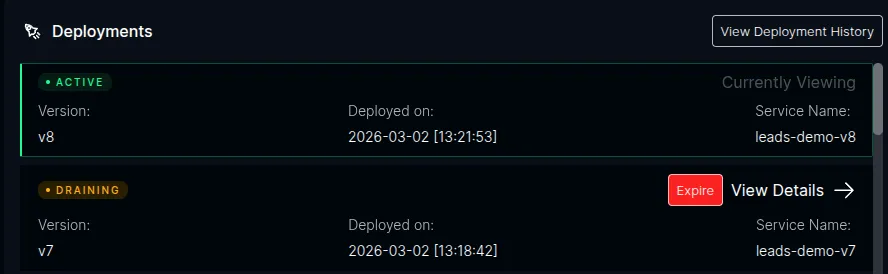
kubectl get pods -n platformatic -l app.kubernetes.io/name=my-appAfter ICC detects the new version, open the ICC dashboard at https://icc.plt/ and navigate to the Watt detail page for your application. The Deployments panel shows the version lifecycle in real time — the new version as Active and the previous version as Draining:
Verify routing
Section titled “Verify routing”Existing session — refresh the page in the same browser. Since the __plt_dpl=v1 cookie is still set, your requests continue to be routed to version 1. You can verify this in the developer tools — no new Set-Cookie header is returned.
New session — open a new incognito/private window and navigate to https://svcs.gw.plt/my-app/. This simulates a new visitor with no cookie. The response should include Set-Cookie: __plt_dpl=v2; ..., pinning this session to version 2.
Expiring a version
Section titled “Expiring a version”Draining versions are expired automatically when the grace period elapses or when there is no more traffic. With the testing profile’s 10-minute grace period, this happens fairly quickly.
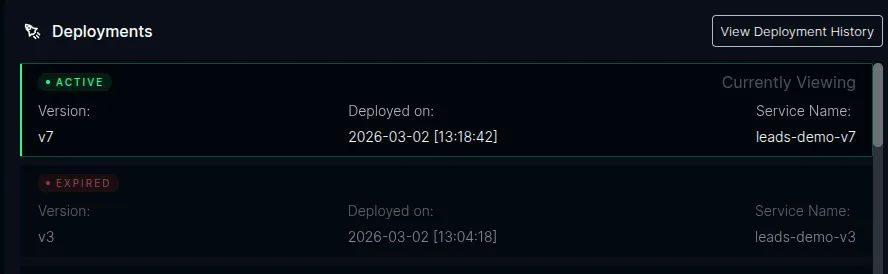
For demos and testing, you can also expire a version immediately by clicking the Expire button next to the draining version in the ICC dashboard. This skips the grace period and triggers the cleanup right away — the HTTPRoute rules for that version are removed and the Deployment is scaled to 0 replicas.
After expiration, the dashboard shows the version as Expired:
Once expired, any browser still holding the old __plt_dpl=v1 cookie will be routed to version 2 on the next request, and a new Set-Cookie: __plt_dpl=v2 replaces the stale cookie.
Clean up
Section titled “Clean up”desk cluster down --profile skew-protection