

Version Lifecycle
ICC manages each application version through a lifecycle of three states: Active, Draining, and Expired. This page explains each state and the transitions between them.
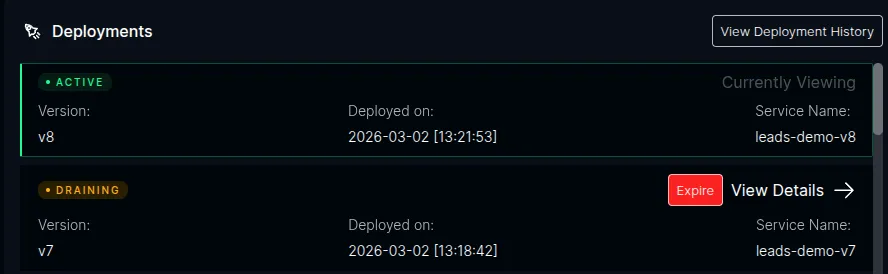
The ICC dashboard shows the current state of all versions in the Deployments panel:
States
Section titled “States”Active
Section titled “Active”The current production version. Exactly one version per application is Active at a time.
- New sessions (visitors without a
__plt_dplcookie) are routed here - The HTTPRoute’s default rule points to this version’s Service
- Responses include a
Set-Cookieheader pinning the session to this version - ICC’s autoscaler scales this Deployment based on real-time load
Draining
Section titled “Draining”A previously active version that still serves existing sessions.
- No new sessions are assigned to it
- Users whose
__plt_dplcookie matches this version continue to be routed here - ICC monitors traffic via Prometheus
- The autoscaler continues scaling this Deployment based on its actual traffic
- A configurable grace period limits how long a version can drain (default: 24 hours)
Expired
Section titled “Expired”A version that has been fully drained and is no longer serving traffic.
- Its HTTPRoute rules have been removed
- Autoscaling is disabled
- The Deployment is scaled to 0 replicas
- If auto-cleanup is enabled, the Deployment and Service are deleted
State Transitions
Section titled “State Transitions”First Version Detected
Section titled “First Version Detected”When the very first version of an application registers with ICC:
- ICC discovers the pod’s labels and identifies the owning Deployment and Service
- The version is recorded with status Active
- ICC creates an HTTPRoute with a single default rule routing all traffic to this version’s Service
- The
Set-Cookieheader is added to responses, pinning sessions early
New Version Deployed
Section titled “New Version Deployed”When a new version is detected while an Active version exists:
- The new version becomes Active
- The previous Active version transitions to Draining
- ICC updates the HTTPRoute:
- Adds a cookie-match rule for the draining version
- Adds a header-match rule for the draining version (for API clients)
- Updates the default rule to point to the new Active version
Version Expires
Section titled “Version Expires”A draining version expires when any of the following occurs:
- Grace period exceeded — the version has been draining longer than the configured grace period (default: 24 hours)
- Zero traffic — ICC detects zero requests per second after the traffic window has passed
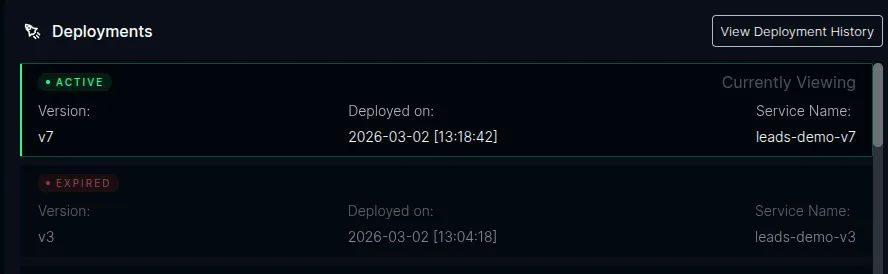
- Manual expiration — a user clicks the Expire button in the ICC dashboard
When a version expires:
- ICC removes the version’s matching rules from the HTTPRoute
- Autoscaling is disabled for the Deployment
- The Deployment is scaled to 0 replicas
- If auto-cleanup is enabled, the Deployment and Service are deleted
Redeployment of an Expired Version
Section titled “Redeployment of an Expired Version”If a version that was previously expired is redeployed (same plt.dev/version label), ICC re-registers it as Active and updates the routing rules accordingly. This is the rollback flow.
Traffic Monitoring
Section titled “Traffic Monitoring”ICC monitors traffic to draining versions by querying Prometheus for per-version requests per second (RPS):
- Check interval — how often the draining checker runs (default: every 60 seconds, configurable via
PLT_SKEW_CHECK_INTERVAL_MS) - Traffic window — the Prometheus query window for RPS measurement (default: 5 minutes, configurable via
PLT_SKEW_TRAFFIC_WINDOW_MS) - Initial skip — the RPS check is skipped until the version has been draining longer than the traffic window to avoid false zero readings
Grace Period
Section titled “Grace Period”The grace period is a configurable maximum duration for draining (default: 24 hours). After the grace period expires, ICC force-expires the version regardless of remaining traffic. This ensures versions are eventually cleaned up even if session tracking is imperfect.
The grace period can be configured via PLT_SKEW_GRACE_PERIOD_MS (default: 86400000 ms / 24 hours). See Configuration for details.
Auto-Cleanup
Section titled “Auto-Cleanup”When a version expires, ICC always scales the Deployment to 0 replicas. Optionally, ICC can also delete the Deployment and Service resources:
- Disabled by default — expired Deployments remain at 0 replicas for users to manually remove
- Enable via
PLT_SKEW_AUTO_CLEANUP=true
Multiple Concurrent Versions
Section titled “Multiple Concurrent Versions”If version v3 is deployed while v1 is still draining (v2 is Active), both v1 and v2 drain simultaneously.
Expired Cookie Handling
Section titled “Expired Cookie Handling”When a user returns with a cookie for a version that has been fully expired (HTTPRoute rule removed), the cookie simply doesn’t match any rule. The request falls through to the default rule and is routed to the current production version. The response sets a new cookie, replacing the stale one. No errors occur.